
In this article we connect a AHT20 Temperature & Humidity Sensor to a Raspberry Pi Pico running Circuitpython
Sensor Information
AHT20, as a new generation of temperature and humidity sensors, has established a new standard in size and intelligence. It is embedded in a double row flat no-lead package suitable for reflow soldering, with a bottom of 3 x 3 mm and a height of 1.0 mm.
The sensor outputs calibrated digital signals in standard IAHT20, as a new generation of temperature and humidity sensors, has established a new standard in size and intelligence.
It is embedded in a double row flat no-lead package suitable for reflow soldering, with a bottom of 3 x 3 mm and a height of 1.0 mm.
The sensor outputs calibrated digital signals in standard I2C format. AHT20 is equipped with a newly designed ASIC chip, an improved MEMS semiconductor capacitive humidity sensing element and a standard on-chip temperature sensing element.
| Supply voltage | DC : 2.0 – 5.5V |
| Measuring range (humidity) | 0 ~ 100% RH |
| Measuring range (temperature) | -40 ~ + 85 ℃ |
| Humidity accuracy | ± 2 % RH ( 25 ℃ ) |
| Temperature accuracy | ± 0.3 ℃ |
| Resolution | temperature: 0.01℃ Humidity: 0.024%RH |
| Response time | temperature: 5s humidity: 8s 1/e (63%) |
| Output signal | I2C signal |
This is the sensor that I bought
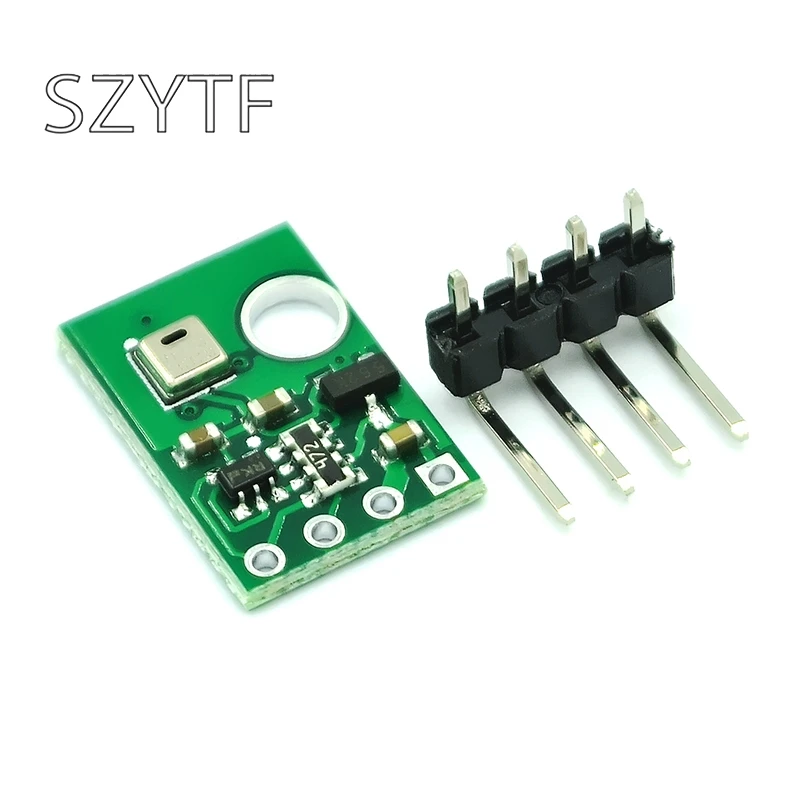
Parts Required
The sensor you can pick up in the $6 price range – you can connect to the sensor using a standard header the classic dupont style jumper wire.
I used a Qwiic cable – since a few sensors seem to use these but this is optional
| Name | Link |
| Pico | Raspberry Pi Pico Development Board |
| AHT20 | AHT20 Temperature and Humidity Sensor Module High-precision Humidity Sensor |
| Connecting cables | Aliexpress product link |
Schematic/Connection
I used the Adafruit AHT20 sensor and in this case used the Stemma connection
For the STEMMA QT cables, it uses the Qwiic convention:
Black for GND
Red for V+
Blue for SDA
Yellow for SCL
So color coded for ease of use, this layout shows a connection to the module
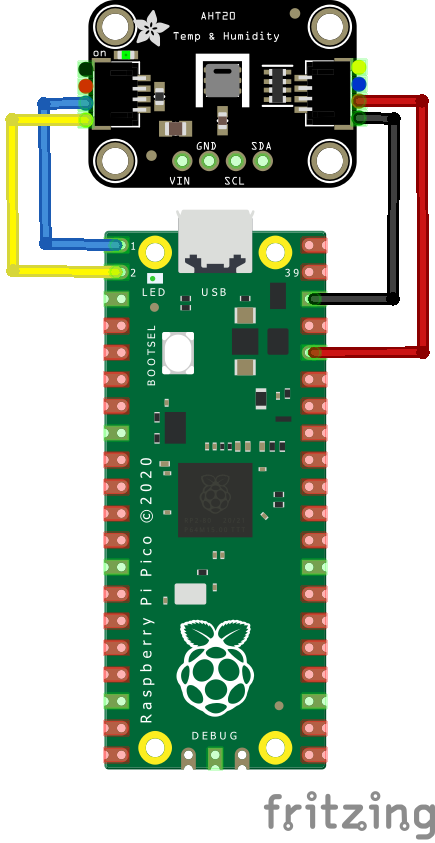
rp2040 and aht20
Code Example
I used Thonny for development
The following is based on a library , I copied the adafruit_sht4x.mpy library for this device to the lib folder on my RP2040 – https://circuitpython.org/libraries
This is the basic example which comes with the library
[codesyntax lang=”python”]
import time
import board
import adafruit_ahtx0
import busio

# Create sensor object, communicating over the board's default I2C bus
#i2c = board.I2C()  # uses board.SCL and board.SDA
i2c = busio.I2C(scl=board.GP1, sda=board.GP0)
sensor = adafruit_ahtx0.AHTx0(i2c)

while True:
    print("\nTemperature: %0.1f C" % sensor.temperature)
    print("Humidity: %0.1f %%" % sensor.relative_humidity)
    time.sleep(2)
[/codesyntax]
Output
Here is what I saw in Thonny REPL window
Temperature: 19.4 C
Humidity: 61.8 %
Temperature: 19.4 C
Humidity: 61.8 %
Temperature: 19.4 C
Humidity: 61.8 %
Temperature: 21.8 C
Humidity: 62.6 %
Temperature: 21.8 C
Humidity: 62.6 %
Links
